
Pippi World :Avatar Life
Kitten dollEducational
4.1419.00 Reviews
- Version
- 1.4
- Installs
- 10.00M
- Age Rating
- Everyone
Screenshots

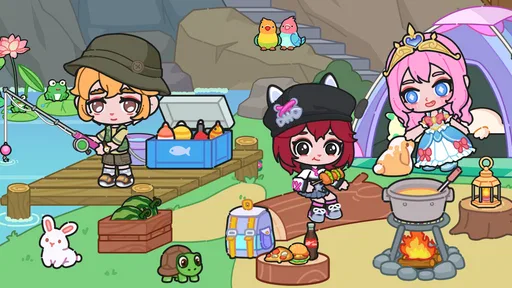
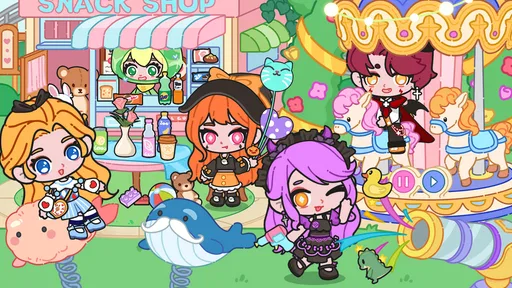

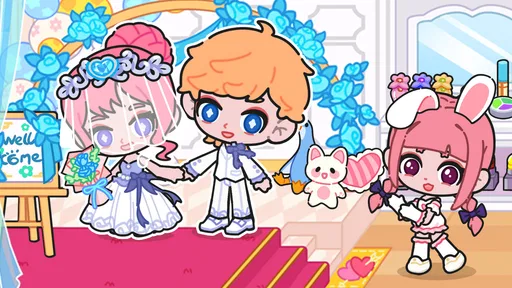

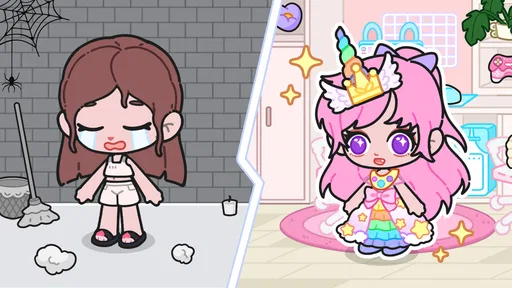
Our Review of Pippi World :Avatar Life
 Analysis by Appyee
I approached Pippi World:Avatar Life as a casual dress-up and creative play space rather than a game with a demanding win condition. That distinction matters. Its appeal comes from choosing an avatar, changing the look, arranging a scene, and turning small styling decisions into a personal little world. The experience is aimed at Everyone, so it is easy to understand, gentle in tone, and suitable for children who enjoy imaginative play as well as adults looking for something light.
The game is free, belongs to the educational category, and comes from Kitten doll. It has attracted over ten million installs and holds an average rating of 4.1 from around twenty-six thousand ratings, which suggests that its simple creative format has reached a broad audience. I can see why: there is no complicated tutorial to study before starting, and the basic loop is immediately recognizable. You open the game, make a character, dress them, adjust the setting, and begin experimenting.
That simplicity is also the key to judging it fairly. This is not the right choice if you want a story-driven adventure, competitive challenges, deep character statistics, or a structured lesson plan. It works better as an accessible avatar customization game with an educational flavor: it encourages choices, visual organization, role-play, and storytelling without turning those activities into formal exercises.
How the everyday play loop works
I find the everyday loop works best when I give a session one small goal: settle on a character’s mood, choose an outfit that fits, then shape the party scene around that idea. This keeps browsing from taking over and gives children an easy way to explain their choices aloud. Once that routine feels familiar, the next question is how to make each new character feel distinct without turning play into a long search.
Start with a purpose instead of changing everything at once
My most comfortable way to use the game is to begin with a small idea. Rather than opening every customization option and tapping randomly, I decide what kind of scene I want first: a party, a relaxed home moment, or a character with a particular personality. That gives the session direction and makes the many visual choices feel less scattered.
The first few minutes are especially approachable for younger players. The controls are based on visible choices rather than complicated commands, so a child can understand the relationship between selecting an item and seeing it appear on the avatar. That immediate response makes experimentation rewarding. If a combination looks strange, it can be changed without treating the mistake as a failure.
I also found that the game works well as a shared activity. A parent can ask a child why a character needs a certain outfit, what the character is doing at the party, or which room would suit the scene. Those questions turn ordinary dress-up into a simple storytelling exercise. The app does not need to announce a lesson for this to happen; the creative decisions provide the opening.
Build the character in layers
A useful workflow is to separate the avatar into broad decisions. I begin with the overall appearance, then move to clothing, accessories, and the surrounding setting. This prevents the common problem of choosing an attractive item early and then forcing the rest of the character to match it.
For example, I might decide that the character should look ready for a celebration before choosing individual pieces. After that, I select an outfit with the mood in mind, add details carefully, and only then arrange the environment. The result is usually more coherent than a character assembled through unrelated taps.
This layered approach is also helpful for children who become overwhelmed by choice. Instead of asking them to create an entire world in one go, I suggest one decision at a time. The game becomes easier to manage, and the child still feels responsible for the final result.
Use scenes as short stories
The party theme is more useful when treated as a prompt rather than a destination. I can imagine who invited the guests, what happened before the scene, and what the characters might do next. Even a very short session can produce a beginning, a setting, and a simple event.
That is where the educational value feels most convincing to me. The game supports visual expression and pretend play, but it does not replace a drawing app, a writing tool, or a formal learning platform. I would describe it as a gentle creative aid for practicing choices and narration, not as an academic game.
Check the age and device fit before settling in
The Everyone rating makes the app an uncomplicated option for family use, but suitability still depends on the child. A younger player may need help understanding the interface or deciding what to do next, while an older player may quickly want more depth than the basic dress-up loop provides. The game runs on Android devices using version 6.0 or later, so compatibility is worth checking before expecting it to work on an older phone or tablet.
The current version is 1.4. I would keep the app updated through the normal store process when possible, especially if the game behaves differently after installation or if a device has trouble loading a scene. That is practical advice rather than a promise of a particular update schedule.
Settings worth checking before handing it to a child
There are no complicated settings that need a long configuration session for ordinary play, but I still prefer to inspect the device before giving a child unrestricted access. I check the phone’s general notification behavior, screen-time limits, sound level, and available storage. These are not special controls inside the game; they are simple habits that make casual play less disruptive.
Sound deserves attention because a dress-up game can be used in very different places. At home, audio may add atmosphere. In a waiting room, classroom, or car, silent play is more considerate. I usually lower the device volume before opening the app rather than trying to correct it after a child has already started.
Screen size changes the experience as well. On a larger tablet, visual items are easier to inspect and several people can participate in choosing a look. On a small phone, tapping can feel more cramped, particularly when a child is trying to make precise selections. If the goal is collaborative play, the larger screen is the better fit; if the goal is a quick personal session, a phone is perfectly reasonable.
I also recommend agreeing on a stopping point before play begins. Because the activity is open-ended, there may be no natural moment that says the session is finished. A simple rule such as completing one character and one scene gives the child a clear target without making creative play feel like homework.
Faster patterns for repeat sessions
Experienced use is less about discovering a secret function and more about reducing unnecessary indecision. I get better results when I choose a theme, limit the number of changes, and review the complete scene only after the main outfit is finished. This keeps the session moving and makes it easier to notice whether the character and background belong together.
Another useful habit is to create a small mental palette before selecting items. I might choose two main colors and one accent, then look for clothing and details that stay within that idea. This is not a built-in tool; it is a player technique. It helps children learn that a design can feel organized even when the available choices are playful or exaggerated.
For family use, taking turns works better than letting several people tap at once. One person chooses the character, another selects clothing, and a third decides the setting. The finished scene becomes a shared result, and disagreements become part of the creative process rather than a reason to abandon the activity.
When I want a quick session, I use a three-stage routine: choose the avatar’s mood, select one outfit that communicates it, and place the character in a setting that supports the idea. This is faster than browsing every option. It also makes the game suitable for a short break, provided the player is comfortable leaving the scene unfinished.
For children practicing language, I would add a verbal rule: describe each choice in a complete sentence. “The character is wearing this because…” or “The party is happening here because…” turns tapping into conversation. The app remains the same, but the adult’s prompts make the activity more meaningful.
Where the creative freedom reaches its limits
The main limitation is that the core loop can become repetitive. Dressing an avatar and arranging a party is enjoyable when the player has a fresh idea, but it may feel shallow after several similar sessions. There is no reason to expect this game to provide the long-term progression of a role-playing game or the structured objectives of a traditional educational title.
That lack of pressure is positive for some users and disappointing for others. A child who wants to invent scenes freely may appreciate not being pushed toward a score. Someone who needs missions, rewards, or measurable progress may lose interest. I would choose a more structured game for practicing a specific school subject or for keeping a player engaged through increasingly difficult tasks.
The customization process can also encourage browsing without a clear endpoint. This is why the small routines above matter. Without a theme or stopping rule, a session can become a long search through choices that never quite feels complete. The game is most satisfying when the player treats each scene as a finished creative project, even if that project is modest.
There is a trade-off between accessibility and depth here. Simple controls make the game welcoming, but they also mean that experienced players may run out of new challenges. I would not recommend it as a substitute for a full avatar simulator, a social world, or a design tool with detailed editing. Its strength is the low barrier to imaginative play, not technical complexity.
Who will enjoy it most
I think Pippi World:Avatar Life suits children who enjoy fashion play, pretend parties, and making visual choices without a strict objective. It also fits parents looking for a calm activity that can lead into conversation. The Everyone rating supports that broad audience, though supervision and device habits should still match the child’s age and independence.
It can work for adults too, especially when the goal is a short, relaxing creative break. I would use it when I wanted something more interactive than scrolling but less demanding than a puzzle or strategy game. The free price removes the need to commit financially before deciding whether the style of play is a good match.
I would suggest skipping it if your priority is educational measurement, detailed progression, multiplayer competition, or a substantial narrative. A drawing app is better when you want unrestricted visual creation. A story game is better when you want characters and events to develop through planned chapters. A puzzle game is better when you want clear goals and feedback about performance.
How it compares with familiar alternatives
Compared with a standard dress-up app, this game places more emphasis on the surrounding world and the idea of a party or scene. That gives the player a reason to think beyond the avatar’s clothing. Compared with a sandbox life simulator, however, it feels lighter: the focus is on arranging and imagining rather than managing a large ongoing world.
It is also less demanding than many educational games because it does not make the player solve a sequence of academic tasks before moving forward. That makes it easier to introduce to a reluctant child, but it also means that parents should not expect direct practice in reading, mathematics, or science. The educational benefit is indirect and comes from creative decision-making, sequencing, and discussion.
Against a drawing application, the advantage is speed. A child can produce a character and scene without needing to draw every object from scratch. The disadvantage is control: the player works with the game’s available visual choices rather than having complete freedom over shape, line, and composition.
What the popularity tells me, and what it does not
With more than ten million installs and a 4.1 average, the game clearly has a substantial audience. The review count, around four hundred, shows that there is also a visible body of written feedback around it. I treat those figures as useful context rather than a guarantee that every player will enjoy the same experience.
Popularity is especially easy to misread with a creative game. A large audience can confirm that the basic idea is approachable, but it cannot tell me whether a particular child will prefer open-ended styling or goal-based play. My recommendation depends more on that personality match than on the install total.
My verdict after settling into the routine
I see Pippi World:Avatar Life as a friendly, low-pressure creative game that succeeds when the player brings a little imagination to it. The dress-up and party setup are easy to understand, and the scene-building angle gives the activity more purpose than changing clothes alone. It is free, broadly age-appropriate, and simple enough for shared family play.
The best way to enjoy it is to use a repeatable creative habit: choose a theme, build the avatar in layers, and finish one small scene before starting another. That approach makes the game feel more focused and helps avoid the endless browsing that can weaken open-ended apps.
My final recommendation is positive but specific. I would install it for a child who likes avatars and pretend stories, or for myself when I wanted a gentle creative distraction. I would not choose it for serious learning, deep simulation, or long-term challenge. Kitten doll has made an approachable experience, and its 1.4 release remains most valuable when treated as a compact imaginative activity rather than a complete virtual life.
Verdict
Strengths of Pippi World :Avatar Life
- Creative avatar customization with plenty of cute outfit combinations.
- Open-ended locations encourage imaginative roleplay and storytelling.
- Bright, colorful visuals are appealing to younger players.
- Simple controls make exploring easy for children to understand.
- Frequent interactive objects make rooms feel lively and engaging.
Limitations of Pippi World :Avatar Life
- Some items or areas may require additional purchases to unlock.
- The game can become repetitive after exploring the available locations.
- Limited guidance may leave younger players unsure what to do next.
- Performance may vary on older phones or tablets.
- Online features and purchases may require close parental supervision.
Other Releases by Kitten doll
View All
Ayla World :Avatar City
Role Playing4.1

Pippi World: Princess Avatar
Educational4.2
Similar Picks in This Category
View All
Little Panda Policeman
BabyBus4.0

Monster Trucks Game for Kids 2
Raz Games4.1

Little Panda's Chinese Recipes
BabyBus4.4

Little Panda's Restaurant
BabyBus4.4

Little Panda's Ice Cream Games
BabyBus4.3

Baby Panda Care
BabyBus3.8
Frequently Asked Questions
What is Pippi World: Avatar Life?
Pippi World: Avatar Life is a casual role-playing and life-simulation game where you create customizable characters, decorate locations, and explore a colorful virtual world. You can design outfits, arrange rooms, interact with objects, and create everyday stories through open-ended play. It is aimed mainly at children and families who enjoy creative activities rather than competitive gameplay.
Is Pippi World: Avatar Life free to download and play?
The game can generally be downloaded without an upfront purchase, but some content may be offered through in-app purchases. These optional items can include extra outfits, furniture, locations, accessories, or other customization features. Availability and pricing may differ between Android and iOS, so parents should review the store listing and configure purchase restrictions before allowing children to play.
Is Pippi World: Avatar Life suitable for children?
Pippi World: Avatar Life is designed around colorful, non-violent creative play and does not focus on combat or difficult missions. However, parents should still check the age rating, advertising policy, online features, and in-app purchase options shown in their region. Younger children may also need supervision because they can accidentally open advertisements or request paid content.
Does Pippi World: Avatar Life require an internet connection?
Some parts of Pippi World: Avatar Life may work without a constant internet connection, particularly basic character creation and interaction with downloaded content. Nevertheless, an internet connection can be needed for initial installation, updates, advertisements, account-related functions, or unlocking and restoring purchases. Offline availability may vary by device and version, so it is best to test the game before traveling.
What devices support Pippi World: Avatar Life?
Pippi World: Avatar Life is available for supported Android and iOS devices, but compatibility depends on the operating system version, available storage, and hardware performance. Older phones or tablets may experience slower loading, reduced graphics quality, or crashes. Before downloading, check the official Google Play or App Store listing for the current requirements and make sure enough free space is available.
Play our best games!


